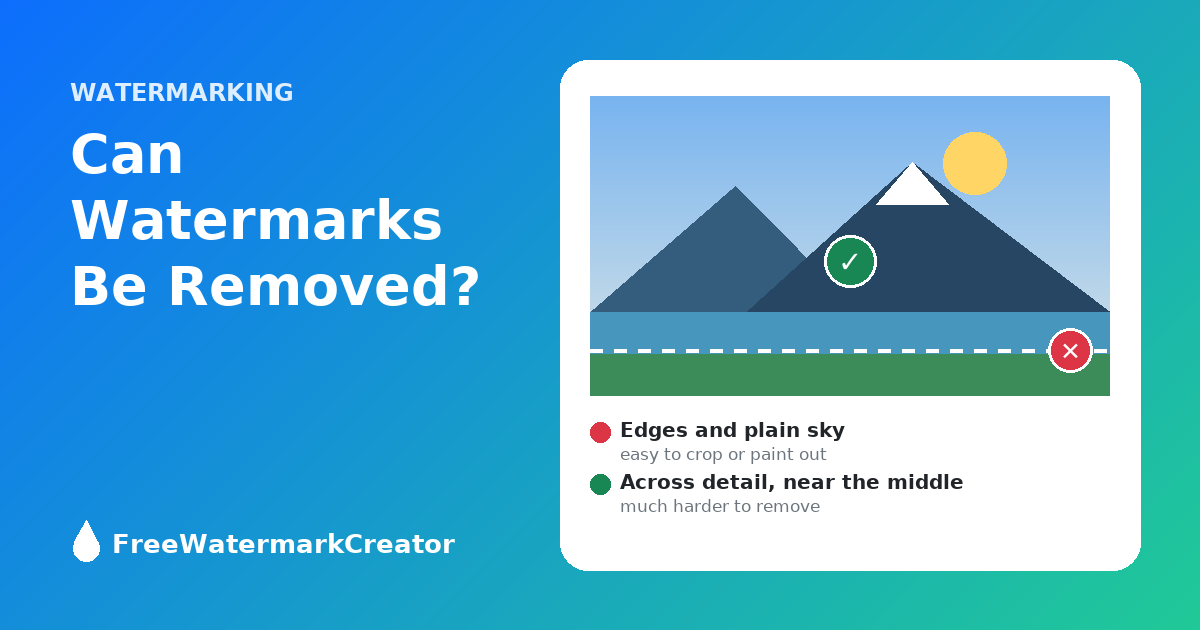
Quick answer
- Yes, any watermark can be removed by someone determined enough. The goal is to make it more trouble than it's worth.
- Hardest to remove: a watermark across detail (trees, water, fabric), away from the edges.
- Add a faint second watermark near the middle, so cropping off your corner mark isn't enough.
- Back it up: post smaller copies, keep your originals, and know your rights if someone removes it.
How watermarks get removed
There are three common ways, from easiest to most effort:
- Cropping. A watermark in a corner or along an edge can be cut off in seconds, along with a thin strip of the photo.
- Cloning and healing. Photo editors can paint over a watermark by copying nearby pixels. This works best when the watermark sits on something plain, like clear sky or a white wall.
- AI removal tools. Newer tools fill in the area behind a watermark automatically. They're good on simple backgrounds and small, faint marks, and less reliable when a watermark crosses detailed areas and important parts of the photo, where they tend to leave smudges and invented detail.
What they have in common: plain backgrounds and edges are easy; detail near the middle is hard.
What makes a watermark hard to remove

- Put it across detail. Texture like foliage, water, fabric or hair is much harder to rebuild than flat color.
- Keep it away from the edges. Anything near an edge can be cropped off. The further in it sits, the more of the photo a crop has to sacrifice.
- Make it readable, not ghostly. Very faint marks are the easiest to blend away. A clearly visible watermark is harder to remove, though more noticeable, so it's a trade-off: our opacity examples show the range.
- Use text with an outline. Two colors (light text, dark outline) crossing a busy area leave more to clean up than a single faint shape.

The catch is that a watermark near the middle also gets in the way of enjoying the photo. For everyday posts, a corner mark is fine; save the harder-to-remove placements for work you sell or that gets stolen often. Our placement guide covers every position.
The two-watermark technique
You don't have to choose between a subtle watermark and a hard-to-remove one. Use both:

- Add your visible watermark in a corner with our free watermark tool, and download the result.
- Upload that result again and add a second, faint watermark (about 15% opacity) in the center.
- Download the final image. Someone who crops off the corner still leaves your name in the middle.
Try the two-watermark technique. Free, with a live preview of each pass.
Open the watermark toolProtection beyond the watermark
- Post smaller copies. A photo sized for social media is far less useful for printing or reselling than your full-resolution original.
- Keep your originals. The full-size file, or your camera's RAW file, is your best proof that the photo is yours, even if a copy has its watermark removed.
- Add copyright metadata to the files you share, in your photo editor, after watermarking.
- Check where your photos appear now and then with a reverse image search, such as Google Lens or TinEye.
- (US) Register important work with the U.S. Copyright Office, which matters if you ever need to take legal action.
Our photo copyright guide covers proof of ownership and what to do when someone uses your work.
Is removing a watermark illegal?
- Using the photo without permission is the main problem. If you don't have the right to use a photo, removing the watermark doesn't change that: using it can still be copyright infringement.
- (US) Removing the watermark can be a separate violation. A watermark with the owner's name counts as "copyright management information". Deliberately removing it to hide an infringement breaks section 1202 of the DMCA, which carries its own damages of $2,500 to $25,000 per violation.
- Your own photos are fine. Removing a watermark from your own work, or from an image you've properly licensed, isn't a problem. Usually the seller gives you an unwatermarked file anyway.
So is watermarking worth it?
Yes, for most creators. Most image theft is casual: someone screenshots a photo and reposts it. A watermark stops that from happening anonymously, keeps your name attached when it spreads, and makes deliberate removal take effort (and, in the US, legal risk). It won't stop a determined professional, which is why it works best alongside the other steps above.
Frequently asked questions
Seven positions, adjustable opacity, live preview. No sign-up.